
Guide to deploy Collate binaries in GCP
This guide will help you start using Collate Docker Images to run the OpenMetadata Application in Kubernetes on Google Kubernetes Engine, connecting with Argo Workflows for running ingestion from the OpenMetadata Application itself.Architecture
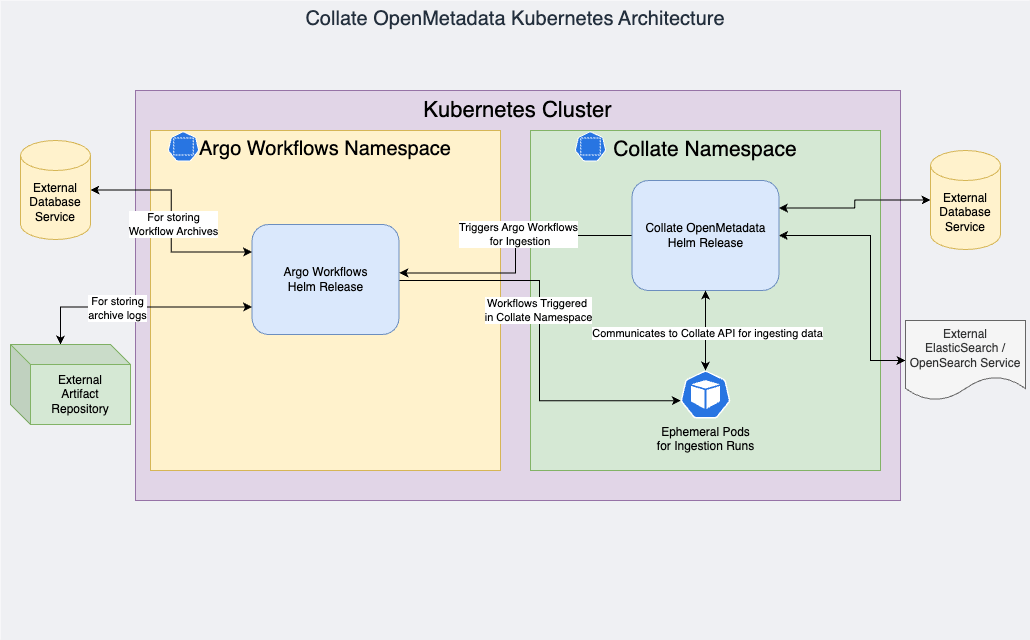
- Collate Server
- Database — Collate Server stores the metadata in a relational database. Collate supports PostgreSQL. GCP Cloud SQL is recommended for production.
- PostgreSQL version 17.6 or greater
- Search Engine — OpenSearch 3.4. ElasticSearch is not supported in Collate BYOC because Collate AI relies on OpenSearch’s vector capabilities for Semantic and Hybrid Search.
- Workflow Orchestration — We use Argo Workflows as the orchestrator for ingestion pipelines.
GKE Autopilot mode restricts elevated permissions required by some workloads. Use GKE Standard mode for Collate deployments.
Sizing requirements
Hardware requirements
A GKE Standard cluster with a managed control plane and at least five worker nodes is the required configuration. Each worker node should have at least:- 4 vCPUs
- 16 GiB Memory
- 128 GiB Storage capacity
Software requirements
- Collate OpenMetadata supports Kubernetes cluster version 1.29 or greater.
- Collate Docker Images are available via private AWS Elastic Container Registry (ECR). The Collate Team will share credentials and steps to configure Kubernetes to pull Docker Images from AWS ECR.
- For Argo Workflows, Collate OpenMetadata is currently compatible with application version 3.4+.
Recommended GKE instance types
Database sizing and capacity
Our recommendation is to configure Cloud SQL PostgreSQL. For 100,000 Data Assets and 1,000 Users:- 8 vCPUs
- 64 GiB Memory
- 256 GiB Storage Capacity
- High availability (multi-zone) recommended
Search client sizing and capacity
For 100,000 Data Assets and 1,000 Users:- 8 vCPUs
- 64 GiB Memory
- 256 GiB Storage Capacity
The Collate team does not maintain OpenSearch when run inside Kubernetes.
Argo Workflows ingestion runners
The recommended resources are 4 vCPUs and 16 GiB of Memory. Ingestion workloads can be scheduled on preemptible/spot instances to reduce costs.Prerequisites
Enable the required GCP project APIs
Enable the following APIs in your GCP project:- Backup for GKE API (gkebackup.googleapis.com)
- Certificate Manager API (certificatemanager.googleapis.com)
- Cloud Autoscaling API (autoscaling.googleapis.com)
- Cloud DNS API (dns.googleapis.com)
- Cloud Key Management Service (KMS) API (cloudkms.googleapis.com)
- Cloud Logging API (logging.googleapis.com)
- Cloud Monitoring API (monitoring.googleapis.com)
- Cloud Resource Manager API (cloudresourcemanager.googleapis.com)
- Cloud SQL (sql-component.googleapis.com)
- Cloud SQL Admin API (sqladmin.googleapis.com)
- Cloud Storage API (storage-component.googleapis.com)
- Compute Engine API (compute.googleapis.com)
- Container File System API (containerfilesystem.googleapis.com)
- Container Registry API (containerregistry.googleapis.com)
- Gemini API (generativelanguage.googleapis.com)
- Google Cloud Storage JSON API (storage-api.googleapis.com)
- IAM Service Account Credentials API (iamcredentials.googleapis.com)
- Identity and Access Management (IAM) API (iam.googleapis.com)
- Kubernetes Engine API (container.googleapis.com)
- Network Connectivity API (networkconnectivity.googleapis.com)
- Network Security API (networksecurity.googleapis.com)
- Network Services API (networkservices.googleapis.com)
- Secret Manager API (secretmanager.googleapis.com)
- Service Management API (servicemanagement.googleapis.com)
- Service Networking API (servicenetworking.googleapis.com)
- Service Usage API (serviceusage.googleapis.com)
Enable GKE Workload Identity
Workload Identity allows Kubernetes service accounts to act as GCP service accounts, eliminating the need for static credentials. Check if Workload Identity is enabled on your cluster:Create a GCS bucket for Argo Workflows artifacts
Argo Workflows archives ingestion logs to Google Cloud Storage:Create GCP service accounts
We require 3 GCP service accounts for the Collate Server, Collate Ingestion, and Argo Workflows:Grant GCS access to GCP service accounts
Bind GCP service accounts to Kubernetes service accounts with Workload Identity
Bind the GCP service accounts to Kubernetes service accounts using Workload Identity. This allows applications running in Kubernetes to authenticate with GCP services using the associated GCP service account without needing static credentials.The following command assumes the Kubernetes service accounts are created in the
argo-workflows and collate namespaces with the names argo-workflows-controller-sa, argo-workflows-server-sa, and om-role respectively. Adjust the service account names and namespaces based on your configuration.Grant GCP service accounts access to Cloud SQL
The configuration in this guide is based on Cloud SQL for PostgreSQL as the database for Collate with IAM Authentication enabled. For more information about how to set up IAM Authentication, see IAM Authentication. Collate recommends using a single Cloud SQL instance for both Collate Server and Argo Workflows. The instance should have IAM Authentication enabled, with separate databases created for Collate Server and Argo Workflows.If you are using separate Cloud SQL instances for Collate Server and Argo Workflows, ensure you grant access to both instances for the respective service accounts.
IAM database users created for Cloud SQL PostgreSQL are regular PostgreSQL roles. They are not database owners and do not get
CREATE privileges on existing databases by default. After creating the IAM users, connect as an admin user and grant CREATE on the respective databases, for example:Replace
<CLOUD_SQL_INSTANCE_NAME> with the name of your Cloud SQL instance.These SQL users will be used by the Collate Server and Argo Workflows to authenticate with the Cloud SQL instance using IAM Authentication.
In Kubernetes, the configuration uses Cloud SQL Proxy to connect to the Cloud SQL instance securely without exposing the instance publicly.
Set up AWS ECR
Collate will provide the credentials to pull Docker Images from a private registry located in AWS ECR.Install AWS CLI
Follow the AWS CLI installation guide to install AWS CLI on your machine.Configure AWS credentials
Kubernetes Docker registry secrets for AWS ECR
Replace
<<NAMESPACE_NAME>> with the namespace where you want to deploy Collate OpenMetadata Server. If the namespace does not exist yet, create it with kubectl create namespace <<NAMESPACE_NAME>>.Install Argo Workflows
Add Helm repository
Create the Argo namespace
Kubernetes secret for Argo Workflows DB credentials
Create custom Helm values for Argo Workflows
Create a file namedargo-workflows.values.yml:
Deploy Argo Workflows
We target application version 3.7.1 using Helm chart version 0.45.23 (Artifact Hub):Optional: Enable Prometheus metrics
Install OpenMetadata/Collate
Create the Collate namespace
Kubernetes service account for ingestion
Annotate service account with Workload Identity
Create long-lived API token for the service account
Configure Kubernetes roles for the service account
Create a fileom-argo-role.yml:
Install OpenMetadata Helm chart
Create Kubernetes Secrets for the database connection:If you plan to use the DeltaLake connector, the
ARGO_INGESTION_IMAGE value should be:
118146679784.dkr.ecr.eu-west-1.amazonaws.com/collate-customers-ingestion-eu-west-1:om-2.0.2-cl-2.0.2openmetadata.values.yml: